
Understanding Asynchronous Programming in Java script - in depth: How It Enhances Responsiveness in Modern Web Applications
Asynchronous programming is a technique that enables your program to start a potentially long-running task and still be able to be responsive to other events while that task runs, rather than having to wait until that task has finished. Once that task has finished, your program is presented with the result. Many functions provided by browsers, especially the most interesting ones, can potentially take a long time, and therefore, are asynchronous. For example: Making HTTP requests using fetch(), Accessing a user's camera or microphone using getUserMedia(), Asking a user to select files using showOpenFilePicker()
JAVACRIPTFULL STACK DEVELOPMENTASYNCHRONOUSLYPROMISESCALL BACKASYNC AWAITSETINTERVAL
Abhay Kumar
5/19/20245 min read

What is Asynchronous Programming?
Asynchronous programming is a technique that enables a program to initiate tasks that may require considerable time to complete without halting the execution of other operations. This approach is crucial in maintaining the responsiveness and performance of modern web applications. By allowing a program to proceed with other tasks while waiting for long-running processes to finish, asynchronous programming ensures that the user experience remains smooth and interactive.
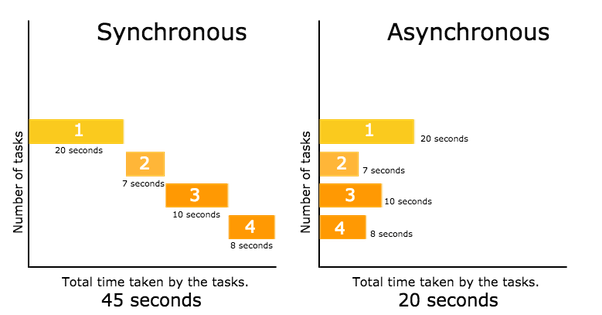
In traditional synchronous programming, each task must complete before the next one begins. This can lead to significant delays, particularly when performing operations such as fetching data from a server, accessing hardware like cameras and microphones, or handling user file selections. Users may experience these delays as the application freezing or becoming unresponsive, which can detract from the overall user experience.
Conversely, asynchronous programming allows the application to initiate these time-consuming tasks and continue processing other events in parallel. For instance, when a web application needs to fetch data from a remote server, it can send the request and then proceed with other tasks while waiting for the server's response. This non-blocking behavior ensures that the application remains responsive to user interactions, enhancing the user experience.
Asynchronous programming is typically achieved through constructs such as callbacks, promises, and async/await syntax in various programming languages. These constructs enable developers to write code that is both efficient and easier to maintain. By leveraging these tools, developers can create web applications that handle multiple tasks concurrently, providing a seamless and fluid user experience even during complex operations.
In summary, asynchronous programming is an indispensable technique in modern web development, significantly improving application responsiveness and performance. By allowing applications to handle long-running tasks without becoming unresponsive, developers can ensure that users enjoy a smooth and interactive experience, regardless of the complexity of the tasks being performed.
Practical Applications of Asynchronous Programming in Web Development
Asynchronous programming plays a crucial role in modern web development by ensuring that applications remain responsive and interactive, even when performing time-consuming tasks. One of the most prominent examples of this is making HTTP requests using the fetch() API. By employing this API, web applications can retrieve data from servers without blocking the main thread. This means that users can continue interacting with the user interface while data is being fetched in the background, thereby enhancing the overall user experience.
Another important application of asynchronous programming is seen in accessing hardware resources, such as a user's camera or microphone, through the getUserMedia() API. These operations can take an indeterminate amount of time, especially when waiting for user permissions or hardware initialization. Asynchronous handling of these tasks ensures that the application does not freeze, allowing users to continue their activities without interruption. This is particularly vital for applications that rely on real-time video or audio input, such as video conferencing or streaming platforms.
Moreover, the showOpenFilePicker() function exemplifies the need for asynchronous programming in file handling processes. This function allows users to select files from their device, a process that can be prolonged, especially if the user is navigating through directories or searching for specific files. By leveraging asynchronous techniques, web applications can maintain responsiveness, enabling users to interact with other parts of the application while the file selection process is underway.
These practical applications highlight the significance of asynchronous programming in maintaining the responsiveness and interactivity of modern web applications. By ensuring that time-consuming operations do not block the main thread, asynchronous techniques contribute to a smoother and more efficient user experience, which is essential in today's fast-paced digital environment.
Difference Between Synchronous And Asynchronous
Synchronous JavaScript
Instruction in synchronous code executes in a given sequence.
Each operation waits for the previous operation to complete its execution.
Most of the time JavaScript is used as Synchronous code.
Example :-
console.log('First');
console.log('Second');
console.log('Third');
Output :-
First
Second
Third
Reason :-
Every instruction runs once after the previous instruction gets executed. Due to this synchronous nature of javascript, we get the output of console logs in the sequence we provided in the program.
Asynchronous JavaScript
Instructions in asynchronous code can execute in parallel.
Next operation can occur while the previous operation is still getting processed.
Asynchronous JavaScript is preferred in situations in which execution gets blocked indefinitely.
Example :-
console.log('First');
// Set timeout for 2 seconds
setTimeout(() => console.log('Second'), 2000);
console.log('Third');
Output :-
First
Third
Second
Reason :-
Third gets printed before Second, because of the asynchronous execution of the code. Here setTimeout() function waits for 2 seconds, and in the meantime, the next instruction gets executed without waiting for the previous one to complete the execution.
What are the three ways of asynchronous JavaScript?
Call Back
Promises
Async - Await

setInterval VS setTimeout


If you need repeated executions, use setInterval() instead.
The setInterval() method continues calling the function until clearInterval() is called, or the window is closed.
Use the clearInterval() method to prevent the function from setInterval() .
Calls a function or evaluates an expression repeatedly at specified intervals (in milliseconds) :-
setInterval(function, milliseconds); or myInterval = setInterval(function, milliseconds);
Clears a timer set with setInterval() :- clearInterval(setIntervalFunctionName);
setInterval
calls a function repeatedly after a number of milliseconds
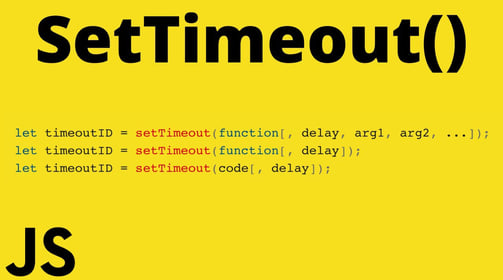
If you need only once executions, use setTimeout() instead.
Use the clearTimeout() method to prevent the function from setTimeout() or from starting .
Calls a function or evaluates an expression once at specified intervals (in milliseconds) :-
setTimeout(function, milliseconds); or myTimeout= setTimeout(function, milliseconds);
Clears a timer set with setTimeout() :- clearTimeout(setTimeoutFunctionName);
setTimeout
calls a function only once after a number of milliseconds
Call Back
A callback is a function passed as an argument to another function.
This technique allows a function to call another function.
A callback function can run after another function has finished.
Promises
Callback Alternatives :- Why Promises Introduced
With asynchronous programming, JavaScript programs can start long-running tasks, and continue running other tasks in parallel.
But, asynchronus programmes are difficult to write and difficult to debug. Because of this, most modern asynchronous JavaScript methods don't use callbacks. Instead, in JavaScript, asynchronous programming is solved using Promises instead.
"Producing code" is code that can take some time.
"Consuming code" is code that must wait for the result.
A Promise is a JavaScript object that links producing code and consuming code