Understanding the Differences Between Async and Defer in Script Loading
5/19/20244 min read
Introduction to Script Loading in JavaScript
Why Script Loading Order Matters ?
Script loading order significantly impacts web performance and functionality. When scripts are executed out of order, it can lead to errors, as certain functions or libraries may not be available when needed. For instance, if a script relies on jQuery but is loaded before jQuery itself, it will cause a failure. Proper sequencing ensures that dependencies are met and scripts can execute correctly.
Moreover, blocking scripts, which are loaded synchronously, can delay the rendering of a webpage, resulting in a slower load time and a poorer user experience. By prioritizing essential scripts and deferring or asynchronously loading non-critical ones, websites can achieve faster initial load times and improved interactivity. This practice not only enhances user satisfaction but also contributes to better SEO rankings, as search engines prioritize faster, more responsive sites.
In addition, a well-organized script loading strategy helps in avoiding conflicts between different libraries or scripts. When scripts are loaded in a controlled, predictable manner, it reduces the risk of unexpected behaviors and ensures the website operates seamlessly and efficiently. Therefore, managing script loading order is key to optimizing web performance and providing a smooth, reliable user experience.
The Impact of Script Loading on Web Performance
Script loading has a profound impact on web performance. Proper script management ensures that web pages load quickly and function smoothly. When scripts are loaded synchronously, they can block the rendering of a webpage, resulting in slower load times and a poor user experience. Prioritizing critical scripts and deferring or asynchronously loading non-essential ones can significantly improve initial load times and overall site responsiveness.
Incorrect script loading order can also cause errors, as dependencies might not be met. For example, if a script that relies on jQuery is loaded before jQuery itself, it will fail. Ensuring scripts are loaded in the correct sequence prevents such issues and maintains functionality.
Additionally, efficient script loading reduces the risk of conflicts between different libraries or scripts, promoting a seamless operation of the website. This not only enhances user satisfaction but also boosts SEO rankings, as search engines favor faster and more responsive sites.
In summary, managing script loading order and method is crucial for optimizing web performance, ensuring fast load times, reducing errors, and providing a reliable and enjoyable user experience.
Understanding the Basics: What Are Async and Defer?
When loading scripts on a webpage, you can enhance performance using the `async` and `defer` attributes. These attributes control how and when scripts are loaded and executed. They help prevent blocking of the page rendering, ensuring a smoother and faster user experience. Understanding these attributes can significantly improve your web performance by optimizing script loading times.
The Default Script Loading Behavior
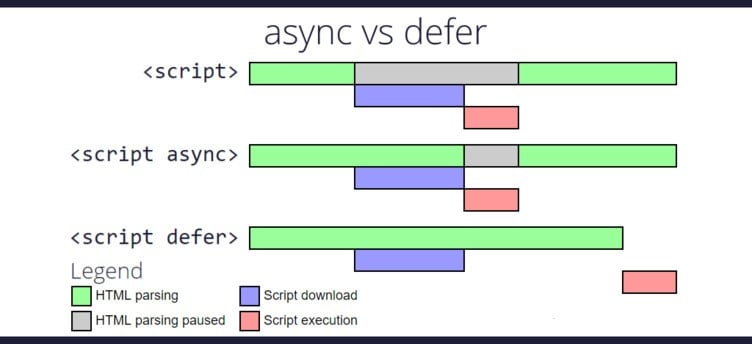
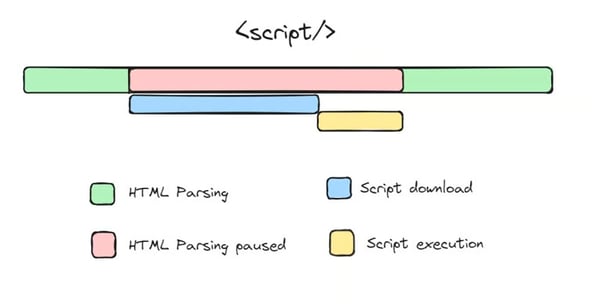
By default, when a browser encounters a `<script>` tag without any attributes, it stops rendering the HTML to download and execute the script immediately. This behavior is known as synchronous loading. It can slow down the webpage because the browser must wait for the script to be fully downloaded and executed before continuing to render the rest of the page. This can lead to a less responsive and slower-loading website, especially if there are large or multiple scripts involved.
The parsing of the HTML is blocked
until the JavaScript file is fetched and executed,
leading to slower page load times.
Nowadays, we mostly prefer to
keep the <script> tag after all the contents of the <body> element
to the page get loaded first.
<script src="example.js"></script>
How Async Works
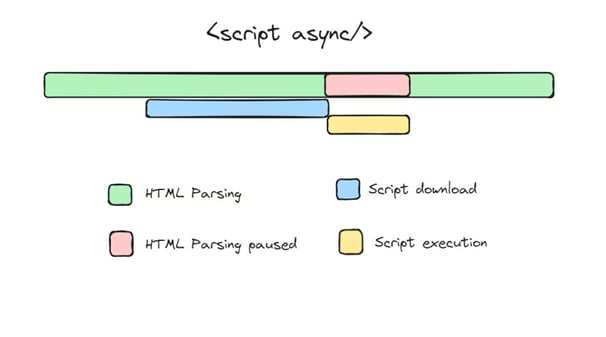
The `async` attribute allows the browser to download the script in the background while continuing to render the HTML. Once the script is downloaded, it is executed immediately, potentially interrupting the rendering process. This means `async` scripts can be executed as soon as they are available, without waiting for the HTML to finish parsing. It’s useful for independent scripts that do not rely on any other scripts or HTML elements being fully loaded, such as analytics or advertising scripts.
async attribute, tells the browser
to download the script asynchronously while parsing the HTML document.
The script is downloaded in the background without blocking the HTML parsing process.
Once the script is downloaded,
it's executed asynchronously, meaning it can run at any time, even before the HTML document has finished parsing.
<script src="example.js“ async></script>
How Defer Works
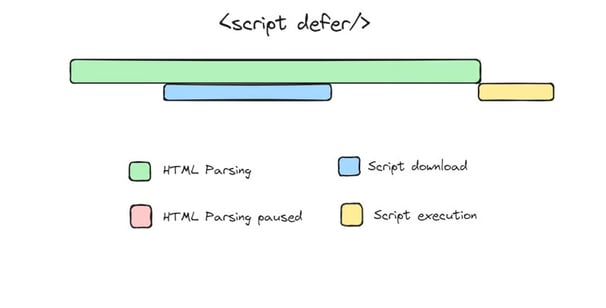
The `defer` attribute also allows the browser to download the script in the background, but it differs from `async` by delaying the execution of the script until the entire HTML document has been fully parsed. This ensures that all HTML content is loaded and available before the script runs, making it ideal for scripts that rely on the DOM being fully built, like those manipulating HTML elements or depending on other scripts. `Defer` helps maintain the order of script execution as they appear in the HTML, ensuring predictable behavior.
By using `async` and `defer`, developers can improve page load times and ensure scripts are executed at the most appropriate times, enhancing both performance and user experience.
Defer attribute, tells the browser
to download the script asynchronously while parsing the HTML document.
The script is downloaded in the background without blocking the HTML parsing process.
Once the script is downloaded,
it's executed after html parsing, meaning it can run after the HTML document has finished parsing.
<script src="example.js“ defer ></script>